
Lightgliders
Made to Shine IncEducational
4.295.00 Reviews
- Version
- 4.1.2
- Installs
- 10.00K
- Age Rating
- Everyone
Screenshots



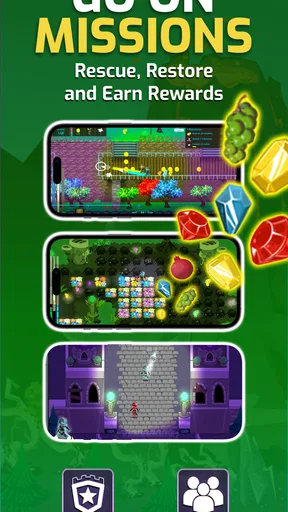

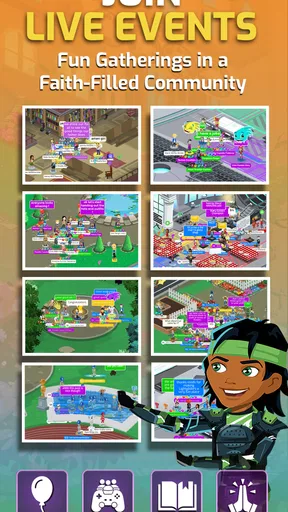

Our Review of Lightgliders
 Analysis by Appyee
I approached Lightgliders as more than a quick children’s game. Its central idea is a faith-oriented virtual world where play, learning, and community sit together, so the important question is not simply whether the first session feels pleasant. I wanted to know whether it could become a useful part of a family’s routine after the novelty of entering a new world wears off.
Made to Shine Inc presents this free educational game for Everyone, and that positioning is immediately helpful: it is designed to be approachable rather than intense, competitive, or difficult to understand. The game has a 4.2 average from around 160 ratings, with over 90 written reviews, and more than 10 thousand installs. Those numbers suggest a modest but real audience, not a huge mainstream hit. In my view, that smaller scale is part of its character, but it also means parents should judge it by fit rather than popularity.
What the first week feels like
I’d treat the first week as a chance to see how your child responds to the world’s faith-centered tone, not as a test of how much progress they can make. A few short sessions together can reveal whether the activities invite curiosity and conversation, or whether the appeal is mostly the novelty of exploring somewhere new. That early read makes it easier to decide what role the game might have over time.
A gentle entry into a faith-based virtual world
The first attraction is the setting itself. Lightgliders is not trying to imitate a conventional action game or a standard school-learning app. It places Christian faith inside a playful virtual environment, which gives families looking for values-based entertainment a clear reason to try it. The concept is more focused than a general sandbox, and that focus can make the experience feel purposeful from the start.
I found the combination of exploration and simple activities easier to approach than a lesson that announces itself as homework. A child can enter with curiosity, try the available games, and encounter the community theme naturally. That matters for younger players who resist anything that feels like a formal teaching tool. The game’s educational category describes its intention, but its strongest appeal is that learning is presented through participation rather than a page of instructions.
The first few sessions are likely to benefit from an adult joining in briefly. Not because the game is necessarily difficult, but because the faith and community elements are more meaningful when a parent or caregiver talks about them. A child may notice a character, activity, or message and move on quickly; an adult can turn that moment into a conversation about kindness, responsibility, or belief. This is one of the app’s less obvious strengths: it works better as shared screen time than as a digital babysitter.
Why the early novelty works
Virtual worlds create an immediate sense of discovery. Even a simple task feels more inviting when it takes place inside a world that the player can revisit. That structure gives Lightgliders an advantage over isolated educational quizzes, which often lose their appeal once the answers become familiar. The faith-based identity also gives the world a consistent tone instead of making it feel like a collection of unrelated mini-games.
During the first week, I would use it in short, predictable windows rather than leaving it open-ended. A child might play after school for a little while, then explain one thing they noticed. Another useful routine would be a weekend session with a parent, followed by a conversation away from the screen. The game can provide a starting point, but the family interaction is what makes the experience more valuable than ordinary casual play.
There is also a practical reason to keep the first week supervised: free games with optional purchases can encourage children to explore every visible option. Lightgliders is free to download, but its in-app purchases range from around six dollars to around one hundred dollars per item. I would set expectations before handing over the device and make sure purchase controls are handled by the adult. That is not a criticism unique to this game; it is simply essential whenever a child is using a free-to-start app.
Who is most likely to enjoy it immediately?
The clearest audience is a Christian family looking for gentle digital entertainment that reflects its beliefs. It may also suit a child who enjoys decorating, exploring, or returning to a familiar world more than chasing fast action. The Everyone age rating makes it broadly accessible, although age labels do not replace parental judgment about a child’s maturity, attention span, or comfort with online community themes.
I would be more cautious about recommending it to a player who wants deep strategy, demanding controls, or a highly competitive challenge. Someone looking for a traditional spelling game, mathematics practice, or a structured curriculum may also prefer a dedicated educational app. Lightgliders is better understood as values-centered play with educational intent, not as a replacement for schoolwork or a complete learning program.
Whether it earns a place after the first month
After the first month, I’d ask whether Lightgliders still gives your family a reason to return that feels worthwhile beyond simply filling screen time. The useful signal is not a fixed play schedule, but whether your child can describe what they enjoy and whether the game still opens up meaningful discussion. If that connection has faded, choosing a different activity is better than keeping it out of habit.
Recurring value depends on the family routine
The first month is where the game has to prove itself. A new virtual world can be exciting for several days, but lasting value comes from having a reason to return. In my experience, Lightgliders has a better chance of staying relevant when the family treats it as one activity in a wider routine rather than expecting the app alone to create a habit.
A helpful pattern is to connect play with discussion. For example, a child could spend a short session exploring the world, then choose one positive behavior to practice that day. The game does not need to carry the entire lesson. Its role can be to make an abstract idea feel concrete enough to discuss. This workflow is more sustainable than asking a child to repeat the same activities without context.
Another practical approach is to give the game a specific place in the week. A Sunday afternoon family session may fit better than unrestricted daily access. That schedule protects the experience from becoming background noise and gives the child something to anticipate. It also lets parents notice whether the app is still encouraging curiosity or whether the child is opening it only out of habit.
What makes it different from ordinary alternatives
Compared with a typical mobile game, Lightgliders offers a more intentional moral and community framework. A mainstream casual title may be better at instant excitement, polished competition, or endless variety, but it usually does not give parents the same faith-centered context. Compared with a Bible-reading app, this game is more interactive and less formal. It may be easier for a child who avoids reading-based devotionals, while a dedicated Bible app will usually be the better choice for direct scripture study.
Compared with a standard educational game, the trade-off is focus. A mathematics or literacy app can make progress easier to measure because the subject is narrow and the tasks are explicit. Lightgliders offers a broader blend of play, community, and Christian values, but that means its learning benefit is less like a worksheet result and more like a conversation starter. Parents who need visible academic progression should use a specialist tool alongside it rather than expecting this game to provide that structure.
This difference is important when deciding whether to keep it installed. If the family wants entertainment that aligns with a particular worldview, the game has a meaningful niche. If the goal is maximum educational efficiency per minute, another category will probably win. Its lasting value comes from the combination of setting and conversation, not from being the strongest tool for one academic subject.
A realistic everyday use case
Imagine a child returning home restless after school. Instead of giving unrestricted access to a video platform, a parent allows a short Lightgliders session while preparing dinner. The child explores, plays, and later mentions an interaction or idea from the world. At the table, the parent asks what happened and connects it to a real-life situation, such as including someone who feels left out. The app has not replaced parenting or teaching; it has created an accessible opening for both.
That scenario also shows the limitation. If the parent is too busy to engage at all, the game may become just another screen activity. The community theme sounds more valuable when a child understands how it relates to behavior outside the device. Families should therefore decide whether they want a shared experience. If they are searching for something that occupies a child independently for a long stretch, this may not be the most satisfying choice.
Maintenance, friction, and the risk of fatigue
Over time, I’d pay attention to small signs of friction: repeated prompts to spend, reluctance to stop, or a child losing interest while continuing to open the game automatically. A brief check-in with your child can distinguish genuine enjoyment from routine tapping, and a pause can be more informative than trying to make every session feel fresh. Those observations help families decide whether the game remains a healthy fit.
The cost of keeping the experience healthy
Maintenance here is less about complicated administration and more about active family guidance. I would periodically check how the child is using the world, whether the activities still feel enjoyable, and whether the community aspect is encouraging positive interaction. A game built around shared values can support good conversations, but children still need help understanding digital behavior and boundaries.
Purchase awareness is another part of maintenance. Since the game is free but includes optional items that can cost from roughly six dollars to roughly one hundred dollars, I would not leave spending decisions to a young player. A simple household rule works well: no purchase happens inside the game without asking first. That keeps the free entry point from becoming a source of arguments and prevents the child from confusing access to the game with permission to buy extras.
Device compatibility is worth checking before building a routine around it. The listed minimum is Android 5.0, which covers older Android devices, but performance can still vary between phones and tablets. I would test it on the actual family device, especially if several children share one screen. A game that feels welcoming in theory will not become a habit if loading, controls, or display size make every session frustrating.
Where repetition may begin to show
The same qualities that make the game approachable can eventually create fatigue. A gentle world is comfortable, but a child seeking constant novelty may move on once the setting feels familiar. The educational and faith-oriented focus also narrows the audience by design. That is a strength for families who want exactly this theme, but it can feel repetitive to players who prefer changing genres or more dramatic challenges.
Community-centered play can create another kind of fatigue if the child does not connect with the social side. Some players enjoy shared spaces and friendly interaction; others prefer private progress and clear goals. If a child repeatedly skips community elements and only wants a quick mini-game, the app may not be meeting its intended purpose. In that case, keeping it installed simply because it is wholesome would not make it useful.
Parents should also watch for the difference between meaningful repetition and empty repetition. Repeating a short activity can reinforce a positive idea when the child is still thinking about it. Repeating it only to collect, unlock, or pass time may reduce the experience to routine tapping. I would change the surrounding activity rather than forcing more screen time: play less often, discuss more, or take a break and return later.
Version, age, and family fit
The current version is 4.1.2, and the game was released on September 11, 2017. That history suggests an established product rather than a brand-new experiment, which can be reassuring for families who prefer something with time behind it. At the same time, an older release date makes it sensible to judge the current experience on the device being used instead of assuming that every modern expectation will be met.
The Everyone rating makes Lightgliders a candidate for shared family use, but I would still introduce it differently to a preschooler, an early reader, or an older child. Younger players may need help navigating and interpreting the world. Older children may need a clear reason to return once the novelty fades. The same app can therefore work well for one child and feel too simple or too narrowly themed for another.
My long-term verdict
I would keep Lightgliders in consideration for families who specifically want a Christian virtual world with educational and community elements. Its strongest quality is not a single game mechanic; it is the way the setting gives parents a gentle route into conversations that ordinary casual games rarely invite. When used in short sessions and connected to real-life discussion, it can earn a recurring place on a family device.
I would not recommend treating it as a complete educational solution, an unlimited social space, or a guaranteed long-term favorite. Children who need academic drills should use a focused learning app. Players who want action, complex strategy, or constant novelty will probably find better options elsewhere. Families uncomfortable with in-app purchasing should also establish controls before the first session, even though the initial download is free.
My practical recommendation is to try it with a clear trial routine: play together at first, set a spending rule, keep sessions purposeful, and review after a few weeks whether the child is still engaging with the ideas rather than merely opening the app. If the game sparks conversation and the child returns willingly without demanding endless screen time, it has earned its space. If it becomes repetitive or disconnected from family life, uninstalling it is a reasonable choice.
In the end, Lightgliders succeeds best as a bridge between play and family guidance. It is approachable, distinctive, and well suited to a particular audience, but its long-term value is maintained by the people around the screen. For the right household, that is precisely why it can last beyond its first-week appeal.
Verdict
Strengths of Lightgliders
- Creative educational games make learning feel engaging and rewarding.
- Covers multiple subjects, including math, reading, science, and social skills.
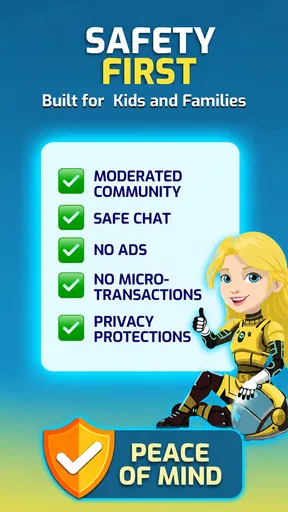
- Safe, child-friendly environment with moderated interactions.
- Progress tracking helps parents monitor learning and activity.
- Bright visuals and simple controls are suitable for younger players.
Limitations of Lightgliders
- Some educational content may feel too basic for older children.
- Several features require a paid membership or in-app purchase.
- An internet connection may be needed for parts of the platform.
- Gameplay can become repetitive after extended sessions.
- Parents may need to help younger children navigate some menus.
Similar Picks in This Category
View All
Little Panda Policeman
BabyBus4.0

Monster Trucks Game for Kids 2
Raz Games4.1

Little Panda's Chinese Recipes
BabyBus4.4

Little Panda's Restaurant
BabyBus4.4

Little Panda's Ice Cream Games
BabyBus4.3

Baby Panda Care
BabyBus3.8
Frequently Asked Questions
What is Lightgliders?
Lightgliders is a family-friendly online game and virtual world where players can explore colorful environments, complete activities, customize their characters, and interact with other users. It combines social features with educational and creative elements, making it more than a traditional action game. The experience is designed to encourage positive behavior, teamwork, exploration, and personal expression in a moderated setting.
Is Lightgliders safe for children?
Lightgliders is designed with younger players and families in mind, offering a moderated environment and safety-focused features. However, parents should still review the available privacy, communication, and parental-control settings before allowing children to play. As with any online game, it is advisable to discuss responsible behavior, avoid sharing personal information, and supervise younger players during their first sessions.
Does Lightgliders require an internet connection?
Yes, Lightgliders generally requires an active internet connection because much of the experience takes place in an online world. Activities, account access, updates, social interactions, and progress synchronization depend on connecting to the game’s servers. It may not be suitable for offline play, so users should check their connection quality and data usage, especially when playing on mobile networks.
Is Lightgliders free to download and play?
Lightgliders can typically be downloaded without an upfront purchase, but some content or features may depend on optional memberships, subscriptions, or in-app purchases. The exact availability of paid elements can vary by platform and region. Before starting, parents should review the store listing and configure purchase restrictions to prevent accidental transactions from being made through the app.
What devices are compatible with Lightgliders?
Compatibility depends on the version available for Android, iOS, or other supported platforms, as well as the device’s operating system and hardware. Before downloading, users should check the official app-store listing for current requirements. A stable connection, sufficient storage, and an updated operating system are recommended for smoother performance, quicker loading, and access to the latest features.
Play our best games!


